CapPro File Finder icon Live now · macOS

Search your computer by what's inside your files.

You remember the contents, not the filename. CapPro File Finder reads the text inside your documents — including scanned paperwork that's really just a photograph — and lets you search all of it in plain language. Everything stays on your machine.

Get CapPro File Finder $9.99/month · 3 days free

Official site: capstone-files.netlify.app ↗

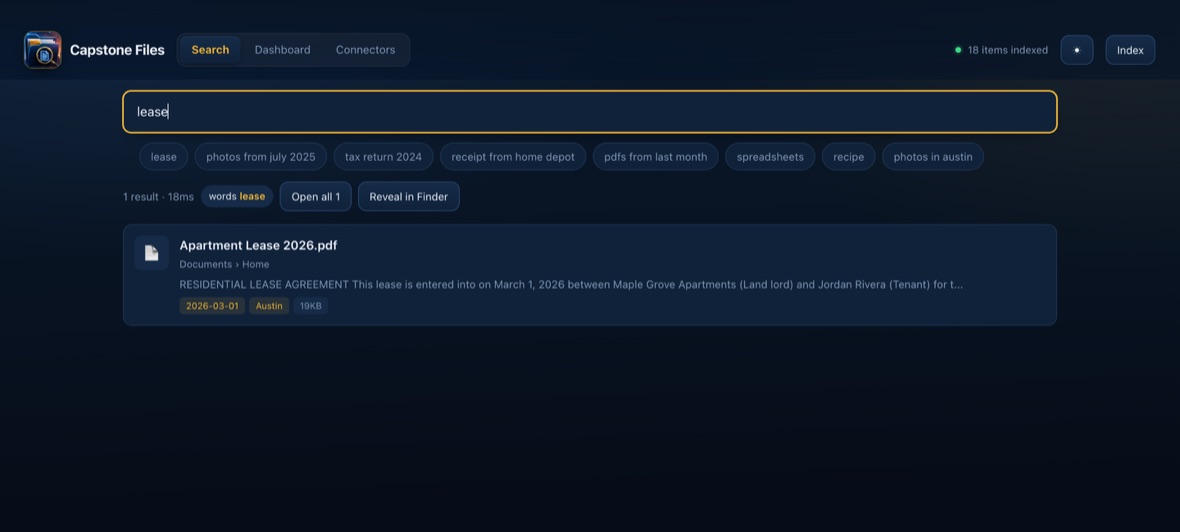
CapPro File Finder shown in use

The problem it solves

You know the document exists. You know roughly what it said and roughly when. What you don't know is which of eleven thousand files it is, which folder it ended up in, or what past-you decided to call it. Built-in search is good at filenames and poor at everything else — and it gives up entirely on a scanned page, because to the computer that's just an image.

  • Full-text search across your documentsFinds the words inside your files, not just the names you gave them.
  • Reads scanned paperworkBuilt-in OCR turns scans and photographed documents into searchable text, so the pile you scanned two years ago finally becomes findable.
  • Plain-English questionsAsk for what you want the way you'd say it out loud — a topic, a name, a month and year — instead of assembling a search syntax.
  • Searches where your files already areDesktop, Documents, Downloads, iCloud Drive, and any Dropbox, Google Drive, OneDrive or Box folder already syncing to the machine.
  • No cloud account to connectIf a cloud drive's desktop app is installed, its synced folder is simply indexed like any other. No sign-in, no permissions screen, no developer console.
  • Use it from your iPad or phoneThe computer keeps doing the work; your tablet opens the same screens over your own Wi-Fi, behind a passcode.
  • Nothing leaves the computerIndexing and search run entirely on your own machine. Your files and their contents are never uploaded to us or to anyone else.
Pricing
$9.99 / month

Three days free to try it against your own files — which is the only test that matters.

  • 3-day free trialIndex your real files and search them
  • Available for macOSDownload and run it today
  • Windows in developmentNot yet available for download
  • Cancel anytimeNo annual commitment required
Get it for macOS

Common questions

Is my data sent anywhere?

No. The index is built on your computer and searches run against it locally. Your documents and their contents stay on the machine — they are not uploaded, and we never see them.

Is there a Windows version?

A Windows build is in development but is not published yet, so there's nothing to download for Windows today. macOS is available now.

Do I have to connect my cloud storage accounts?

No. If you already run the Dropbox, Google Drive, OneDrive or Box desktop app, those synced folders are indexed like any other folder on your disk. There's no account connection step.

What kind of work is it for?

Anything with a lot of documents. It's a general-purpose file finder — contracts, invoices, receipts, statements, correspondence, scanned records, research. It isn't tied to any particular industry or line of work.

How does the iPad access work?

Your computer continues to do the indexing and searching. The iPad simply opens the same screens in Safari over your own Wi-Fi network, protected by a passcode you set.

Stop opening folders one at a time

Three days free on macOS. Point it at the folder you dread most and search for something you know is buried in there.

Get CapPro File Finder